Pre-Launch/Scheduled Launch Feature - New to VERDE 8.2.1
Product Line: VERDE
A feature has been added starting with VERDE/VERDEOS 8.2.1. It's entitled Scheduled Launch. For longtime VERDE users, it's basically an automated version of Hot Seating. You can review the Knowledge Base Article regarding Hot Seating here:
To use the new, automated version, go to the Management Console/Configuration/PRE-LAUNCH/Scheduled Launch. See the following:
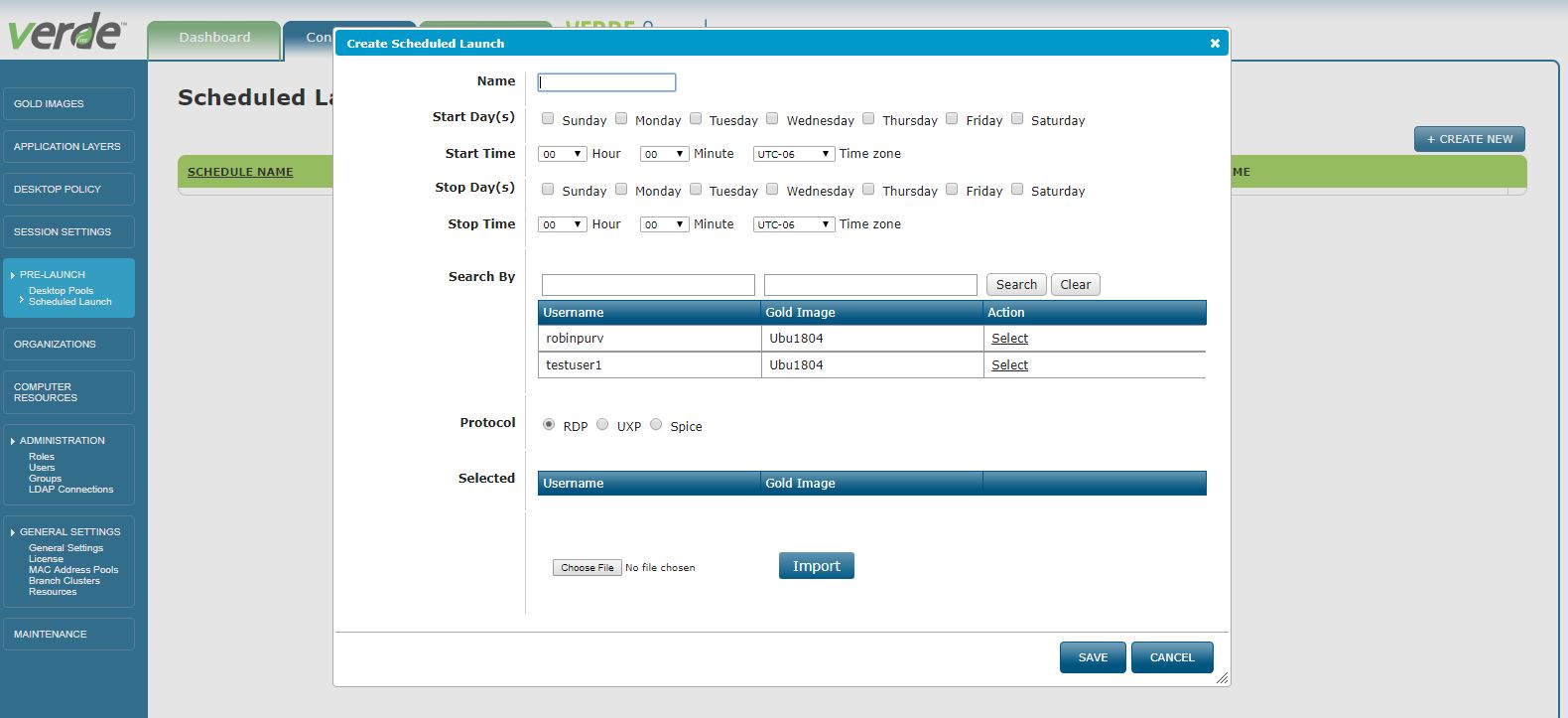
Simply click on the CREATE NEW button and the aforementioned pop-up is displayed.
- Give a unique name. Avoid special characters and spaces.
- Select Start Day or Days
- Start and Stop Times
- You actually have the option to select the time zone
- The UserID associated with the available Images are derived from the current Desktop Policy assignments
- Select the appropriate Protocol. Given only Ubuntu 1804 image is available, the Administrator needs to select SPICE (see following screen shot)
- The Import button allows for the Administrator to import/upload a .CSV file with a list of users and images. This eliminates the need to scroll through the list of users and images; selecting one by one. The format is username/desktop,username2/desktop. Refer to the attached Sample.csv file.
Now simply press SAVE and the following results. The specified user's image will start every Monday, Tuesday and Wednesday at 0800 and shutdown 1600 (4 pm)
Related Articles
Scheduled Launch: If You Only Have Local Users, Local Group Users Can't be Accessed in Scheduled Launch
roduct Line: VERDE If only local users and local groups have been created, only local users that are explicitly listed by userid in Desktop Policies can be accessed via Scheduled Launch. The Drop Down listing All Users/local users only contains ...Scheduled Launch and UTC (Coordinated Universal Time)
Product Line: VERDE As of VERDE/VERDEOS 8.2.6, UTC (Coordinated Universal Time) doesn't work like you would think. If you're scheduling a launch for local time, remove any time offset. Normally, I'm in the Central Standard Time Zone and would set ...VERDE/VERDEOS 8.2.8 New Feature - Remote Access Guest Tools
Product Line: VERDE A new function/feature has been added to VERDE/VERDEOS as of 8.2.8. It is in support of Remote Access. Once the user brings up the VERDE Remote Access client, they can select the option "Register with VERDE Connection Server". ...VLAN Prep Steps - Enable Linux Networking and Installing verde-brctl
Product Line: VERDE The following steps need to be implemented before enabling VLAN. Switching VERDE Node from Openvswitch to Linux Native: Disable openvswitch and enable “Standard Linux Network Configuration” (verde-menu -> 1 Network Configuration ...FAQ: VERDE 8.2 Frequently Asked Questions.
VERDE 8.2 FAQs: What’s new in VERDE 8.2? VERDE 8.2 is our latest VERDE-VDI offering and has been upgraded to use the latest Red Hat / CentOS QEMU-KVM modules for increased performance and hardware emulation capabilities. This means that we are now ...